First Look at The Family RPG Campaign Toolkit Launcher
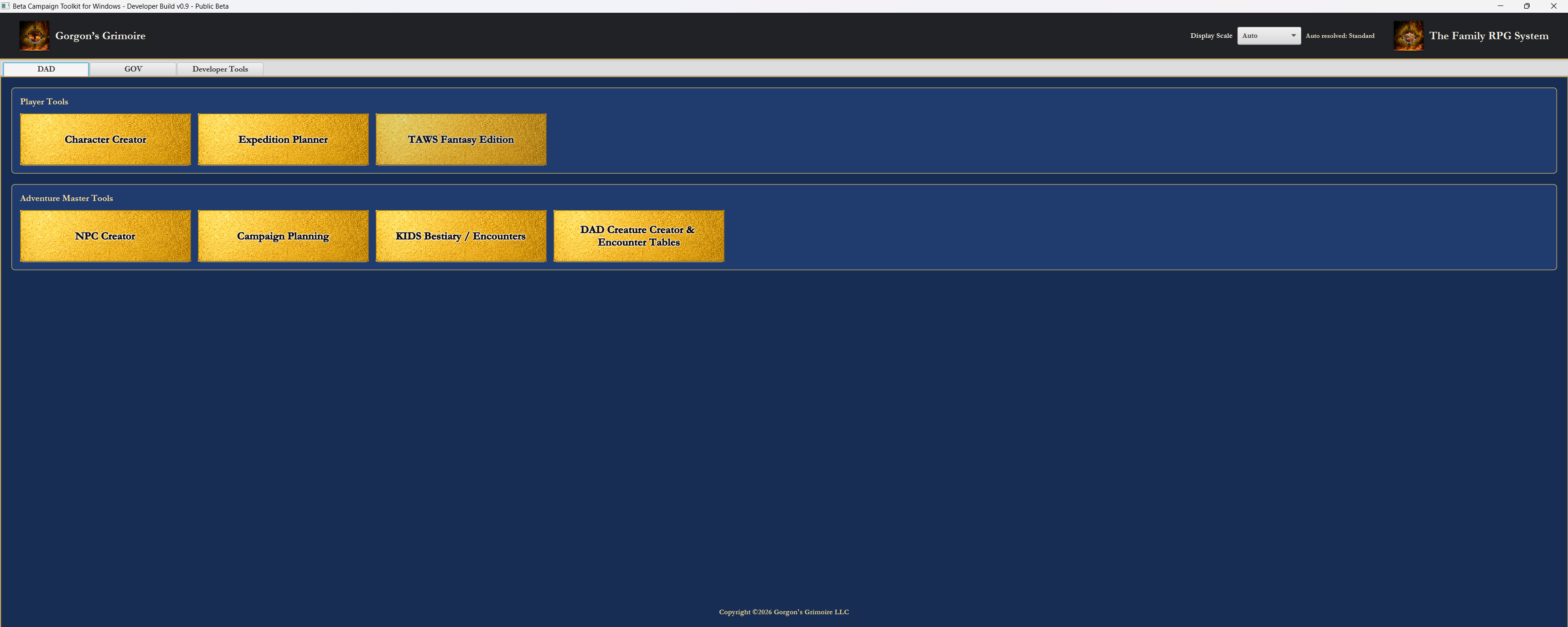
The Family RPG Campaign Toolkit opens with a launcher organized by supported game line. In the current development build, the top tabs show DAD, GOV, and Developer Tools. The visible screen is the DAD tab, where the launcher separates player-facing work from Adventure Master preparation.
In the public release version, the Developer Tools tab will not be included. It exists for development and testing work only.
The DAD Launcher Layout
The DAD tab is divided into two work areas: Player Tools and Adventure Master Tools. That split is intentional. A player building a character or planning an expedition should not have to dig through campaign-facing controls, and an Adventure Master preparing NPCs, encounters, locations, and campaign material should not have to work through a player-only shelf.
The launcher is not trying to be clever. It is trying to be clear. Pick the game line, pick the kind of work, then open the tool that belongs to that job.
Player Tools
Character Creator
The Character Creator opens the DAD character-building tool. It supports full Damsels, Adventurers, and Dragons character creation and maintenance, including the core character record, equipment, proficiencies, spells and known spells where applicable, notes, saves, and exports.
This is the player-facing character desk for DAD. It is built for long-term play, not one disposable stat block.
Expedition Planner
The Expedition Planner opens the DAD travel and logistics tool. Old-school fantasy adventuring includes travel, logistics, animals, gear, and survival, not just combat. The planner supports expedition preparation, hirelings, wages, mounts, pack animals, tack, feed, supplies, cargo, treasure, expenses, and expedition reporting.
The point is to make the practical side of adventure playable instead of invisible. When the party heads into the wilderness, the Toolkit should help the table know what is being carried, who is being paid, what animals are moving the load, and what the expedition costs before the first sword leaves its scabbard.
TAWS Fantasy Edition
TAWS Fantasy Edition is visible as a placeholder for the future fantasy battle-tool side of the Toolkit. It belongs on the DAD player shelf because tactical play and larger clashes are part of the long-term Toolkit plan, but this button should not be read as a finished module.
Adventure Master Tools
NPC Creator
The NPC Creator supports compact but useful DAD NPC creation for settlements, encounters, expeditions, and campaign records. It is meant to help an Adventure Master build usable people quickly without turning every guard, rival, merchant, or guide into a full player-character worksheet.
Campaign Planning
Campaign Planning opens the DAD campaign binder. It supports campaign profiles, party links, locations, sites, hooks, encounters, treasure, consequences, maps, regions, notes, scratchpad material, and handout/export material. This is where campaign material starts to connect instead of living in unrelated scraps.
KIDS Bestiary / Encounters
KIDS Bestiary / Encounters opens the shared Kalarion’s Index of Denizens and Sorcerers bestiary and encounter roller. KIDS is shared by both DAD and GOV where appropriate, giving the Toolkit a common creature and encounter support spine instead of forcing every tool to carry its own isolated list.
DAD Creature Creator & Encounter Tables
DAD Creature Creator & Encounter Tables is the creature design bench. It supports concept, world role, ecology, combat identity, KIDS-style entry writing, readiness checks, and custom encounter table creation. That matters because a creature should not only be a pile of numbers. It should have a place in the world, a reason to appear, and a usable table presence.
What the GOV Tab Does
The GOV tab switches the launcher to the Ghosts of Vietnam side of the Toolkit. It has its own character creator, NPC creator, campaign planning tools, KIDS access, and a Unit Roster Generator for building military rosters and personnel records.
The GOV tab does not merely reskin the same screen. It moves the user into the Vietnam War role-playing side of The Family RPG System, where tools are organized around characters, units, operations, rosters, and mission planning. DAD needs expeditions, fantasy campaign locations, and Adventure Master creature tools. GOV needs military personnel records, unit structure, operations, and mission pressure. The launcher keeps those needs separated while keeping both game lines under the same system roof.
Built Around Serious Play
The launcher is desktop-first, organized around serious play, and built around separate player and Adventure Master workflows. The game-line tabs keep DAD and GOV in their own lanes, while the Toolkit itself is being built around tools that talk to each other rather than isolated utilities.
A character record should be able to matter to an expedition. An expedition should matter to a campaign. A roster should matter to an operation. That is the direction of The Family RPG Campaign Toolkit: practical support for tables that want to play hard, keep records, and make the world remember what happened.
The Family RPG Campaign Toolkit Articles & Essays DAD Product Page GOV Product Page