
DAD NPC Creator Page Guide
The DAD NPC Creator is used to create compact, useful non-player characters for Damsels, Adventurers, and Dragons. It is built for Adventure Master use at the table and during preparation, where an NPC often needs to be ready now without being built like a full player character.
It supports ordinary professionals, hirelings, followers, henchmen, encounter NPCs, settlement NPCs, expedition support NPCs, and campaign figures. A guard at a gate, a guide hired for a week, a temple servant with useful knowledge, a caravan drover, a blacksmith, a rival’s agent, or a recurring village contact can all be recorded in a compact form that still respects the rules.
The NPC Creator does not replace the DAD Character Creator. The Character Creator is for full player characters and major NPCs who need complete character sheets. The NPC Creator is for fast, rules-aware NPCs who can appear in play, receive notes, carry gear, make attacks, use basic proficiencies, and export to handouts or support files.
The NPC JSON save is the working record. Roll20 handouts, PDFs, SillyTavern lorebooks, screenshots, and other exports are outputs, so keep the save current before sending the NPC into another table tool.
NPC Record Page
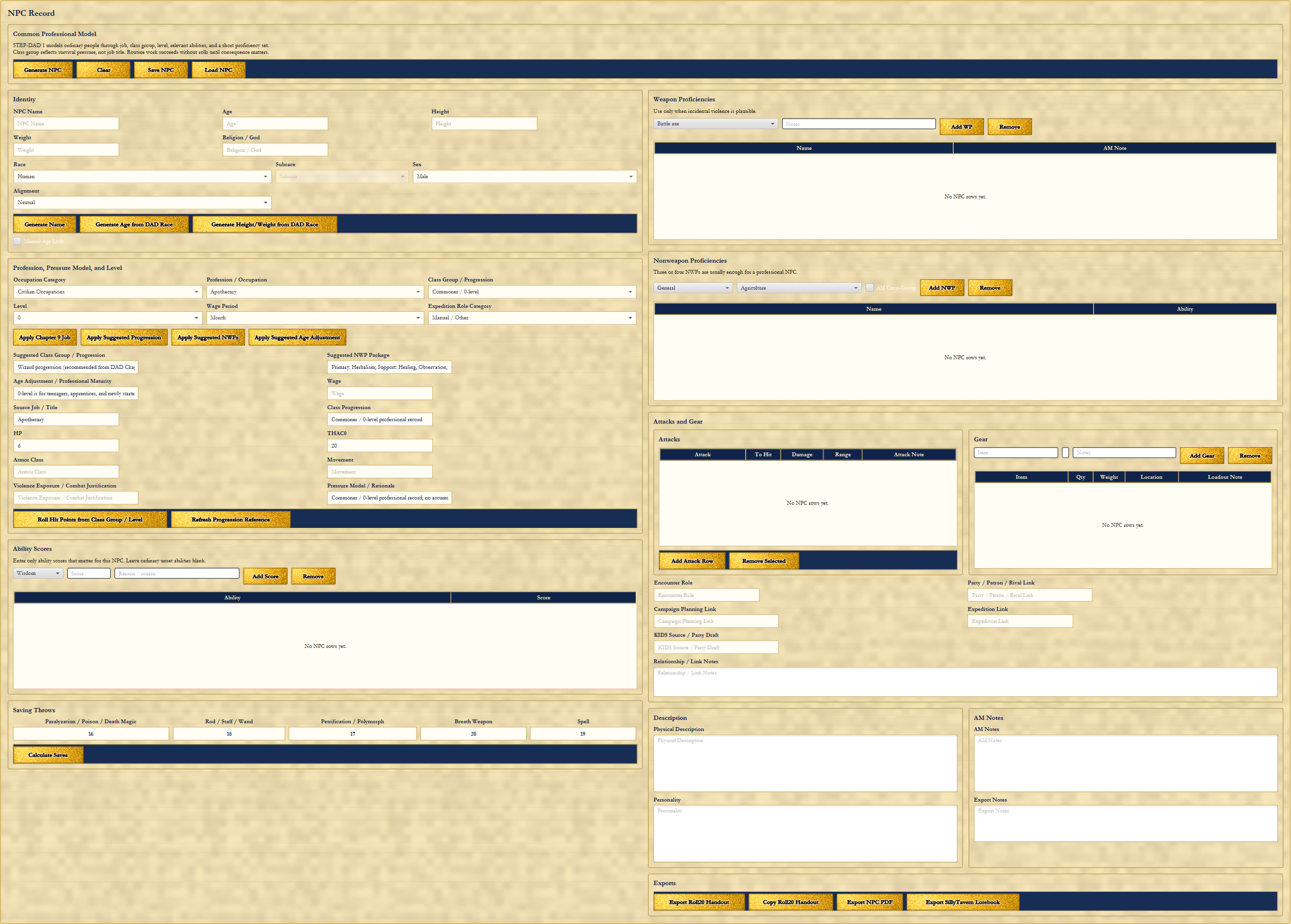
The NPC Creator currently uses a single main NPC Record page. That page contains identity, profession, class group, level, hit points, combat values, proficiencies, gear, attacks, links, description, notes, and exports. The top controls are direct: Generate NPC, Clear, Save NPC, and Load NPC.
The page is meant to produce usable campaign people quickly. It gives the Adventure Master enough structure to run the NPC, connect the NPC to the wider campaign, and keep the record for later without demanding the same weight as a full player-character sheet.
The Common Professional Model
The DAD NPC Creator uses the Common Professional Model from STEP-DAD 1. The basic idea is simple: ordinary people are modeled through job, class group, level, relevant abilities, and a short proficiency set. Most NPCs do not need full player-character sheets to matter at the table.
Profession tells the world what the person does. Class group reflects survival posture, not merely job title. A town guard, caravan guard, sailor, peasant levy, hunter, apothecary, temple servant, or scout may all need different assumptions about risk, weapons, training, wages, and pressure.
Routine work succeeds without rolls until consequence matters. The blacksmith does not need to roll every time a horseshoe is made. The healer does not need a full adventurer sheet to be useful. The roll, combat value, proficiency, or saving throw matters when the situation becomes uncertain, dangerous, contested, or campaign-relevant.
Identity
The Identity section records the visible face of the NPC: NPC name, age, height, weight, race, subrace, sex, alignment, and religion or god. Generate Name, Generate Age from DAD Race, and Generate Height/Weight from DAD Race can help produce a usable person quickly, while Manual Age Lock preserves a deliberate age when the Adventure Master has chosen one.
Identity fields are player-facing unless the Adventure Master decides otherwise. They are the pieces a player might learn through ordinary interaction, observation, rumor, introduction, or repeated campaign contact.
Profession, Pressure Model, and Level
The profession section is where the NPC stops being a blank name and becomes a working person in the campaign. It includes Occupation Category, Profession / Occupation, Class Group / Progression, Level, Wage Period, and Expedition Role Category. Profession is the world-facing role, while class group and progression are the rules model used to make the NPC function.
The page includes Apply Category Job, Apply Suggested Progression, Apply Suggested NWPs, and Apply Suggested Age Adjustment. Suggested Class Group / Progression, Suggested NWP Package, Source Job / Title, Wage, Class Progression, and Pressure Model / Rationale help the Adventure Master see why the NPC is being modeled that way.
Roll Hit Points from Class Group / Level and Refresh Progression Reference keep the rules-facing side of the NPC current. The goal is not to overbuild the NPC. The goal is to give the Adventure Master enough grounded information to run the person under pressure.
Ability Scores
The NPC Creator only needs ability scores that matter. A guide may need Wisdom. A smith may need Strength. A scholar may need Intelligence. A courtier may need Charisma or Appearance. A thief, scout, or assassin may need Dexterity.
That is why the Ability Scores section is compact. Add Score and Remove let the Adventure Master record the relevant abilities without filling every ability box just because a full character sheet would have one. Blank ordinary scores can remain blank until the campaign gives them a reason to matter.
Saving Throws
Saving throws make an NPC usable in play without building a full character sheet. The NPC Record includes Paralyzation / Poison / Death Magic, Rod / Staff / Wand, Petrification / Polymorph, Breath Weapon, and Spell.
Calculate Saves gives the Adventure Master a quick way to make the NPC ready for danger. If a settlement NPC is caught in poison gas, a guard is targeted by a wand, a henchman faces a spell, or an expedition hireling is exposed to death magic, the record already has a place for the answer.
Weapon Proficiencies
Weapon proficiencies record intentional weapon training. The section includes a weapon choice, AM note, Add WP, and Remove. It is there for NPCs whose weapons matter: a town guard with a spear, a caravan guard with a crossbow, a hunter with a bow, a sailor with a cutlass, or a peasant levy with a polearm.
The best NPC records keep weapon lists short and purposeful. If the NPC is not defined by weapons, do not bury the record under them. If the NPC may enter danger, carry a watch post, defend a wagon, or ambush the party, the weapon entries make that danger clear.
Nonweapon Proficiencies
Nonweapon proficiencies record occupational and practical skills. Three or four NWPs are usually enough for a professional NPC. The section supports NWP group, specific proficiency, All Cross-Group, Add NWP, and Remove.
The suggested NWP package is a starting point, not a cage. A healer might need healing and herbal knowledge. A farmer might need agriculture and animal handling. A scout might need direction sense, tracking, or survival skills. A temple servant might need religion and local history. A merchant might need appraising, bargaining, or languages.
The point is to make the NPC useful in play. The proficiencies should tell the Adventure Master what the NPC can reasonably do when the party asks for help, hires support, causes trouble, or returns months later with consequences following behind them.
Attacks and Gear
Attacks and Gear make the NPC immediately usable during play. The Attacks section tracks attack name, to-hit value, damage, range, and attack notes. Add Attack Row and Remove Selected keep the table simple.
The Gear section tracks gear item, quantity, weight, location, and loadout note, with Add Gear and Remove controls. Compact gear is enough unless the NPC is a major figure, expedition hireling, or combatant. A named rival might need a careful kit. A stable hand probably needs a few practical items and a note.
Links and Use in Other Tools
The NPC Creator connects NPCs to the larger Toolkit instead of leaving them as isolated notes. The link fields include Encounter Role, Campaign Planning Link, KIDS Source / Prep Draft, Party / Patron / Rival Link, Expedition Link, and Relationship / Link Notes.
Those links matter because NPCs move. A hireling can become part of an expedition. A settlement NPC can become a campaign record. A monster-prep draft can become an encounter. A patron can become a rival. A recurring NPC can move into handouts, Roll20 support, PDFs, SillyTavern lorebooks, or other export workflows.
Description, Personality, AM Notes, and Export Notes
Description is for the physical description and visible presentation of the NPC. Personality records habits, manner, attitude, motive, speech, fears, loyalties, or the behavior that makes the person memorable at the table.
AM Notes are for information the Adventure Master needs but the players should not automatically see. Export Notes are for what should travel into handouts or support files. Keeping player-facing information separate from AM-only information matters when an NPC may be shown to players later.
Exports
The NPC Creator supports Export Roll20 Handout, Copy Roll20 Handout, Export NPC PDF, and Export SillyTavern Lorebook. These outputs help move a compact NPC record into table tools, handouts, campaign documents, and external support material.
Exports are outputs, not the working record. Save the NPC before exporting if the NPC will continue to be used or edited later. The saved NPC record is what keeps the person available for revision, campaign continuity, and later consequences.
Recommended Workflow for a New NPC
- Enter or generate identity.
- Choose occupation category and profession.
- Review the suggested class group, progression, NWP package, wage, and pressure model.
- Apply suggested progression and NWPs when appropriate.
- Set level and roll hit points.
- Add only the ability scores that matter.
- Calculate saving throws.
- Add a small number of weapon and nonweapon proficiencies.
- Add attacks and gear if the NPC may enter danger or support an expedition.
- Add campaign, encounter, party, patron, rival, or expedition links where needed.
- Add physical description, personality, AM notes, and export notes.
- Save the NPC.
- Export to Roll20, PDF, or SillyTavern only after the saved record is current.
Practical Use Pattern
The NPC Creator works best when the Adventure Master builds only what the NPC needs. Walk-on NPCs may need a name, role, description, and personality. Professional NPCs need occupation, a class group, a few useful proficiencies, and perhaps a wage. Hirelings and expedition NPCs need pay, role, gear, links, and notes that make them easy to carry into travel records.
Encounter NPCs need enough attacks, saving throws, gear, and proficiencies to survive contact with danger. Recurring NPCs need links, notes, personality, and a saved record so they can grow with the campaign. A minor NPC can always deepen later if the table makes that person important.
The NPC Creator produces usable campaign people quickly while preserving the option to deepen them later. That is the right tool for an Adventure Master who needs a living campaign full of people, not a binder full of full character sheets for every apothecary, guard, guide, and rival agent.
Return to Articles & Essays Toolkit Articles The Family RPG Campaign Toolkit